You’re standing in a store, trying to figure out if that “40% off” deal is really worth it. You pull out your phone, tap open the calculator, and… wait. The number doesn’t look right. You try again. Still wrong. Before you know it, you’re second-guessing your math skills and wondering if you’ve forgotten how percentages work.
Here’s the truth: it’s probably not you. It’s your calculator.
The Hidden Problem Nobody Talks About
Most people assume calculator apps are foolproof. After all, they’re built by tech companies with teams of engineers, right? But here’s what’s happening behind that sleek interface: calculator apps are designed for basic arithmetic, not the way humans actually think about percentages in real life.
When you’re trying to calculate “What’s 20% of $150?” your brain is asking a simple question. But your calculator? It’s waiting for you to translate that into mathematical operators it understands. And that’s where things get messy.
The Five Most Common Calculator Mistakes (That Feel Like the App’s Fault)
1. The Order of Operations Trap
You type: 150 - 20% =
You expect: $120 (which is $150 minus 20% of $150)
You get: Something completely random, or an error.
What’s happening: Most basic calculators don’t automatically calculate “20% of 150.” They’re waiting for you to tell them what to do with that percentage. Some calculators interpret the percentage button differently depending on what operation comes before it. It’s like speaking two different languages.
2. The Discount Confusion
You’re buying a $80 jacket that’s 25% off. You confidently type: 80 - 25% and hit equals.
Your phone shows: 55 or 79.75 or sometimes just blinks at you.
The real calculation you need: First find 25% of $80 (which is $20), then subtract it. That’s actually two steps: 80 × 0.25 = 20, then 80 - 20 = 60.
But who has time for that when you’re standing in a checkout line?
3. The Tip Calculation Disaster
Dinner bill: $67.50. You want to leave 18% tip.
You try: 67.50 + 18% =
Result: Confusion, a potentially wrong tip, and your friends wondering why you’re taking so long.
Why it fails: The calculator doesn’t know you want to ADD 18% to the original amount. It just sees disconnected numbers and operators. What you actually need is either 67.50 × 1.18 = or 67.50 × 0.18 = [tip amount] then add it manually.
4. The Percentage Increase/Decrease Mix-Up
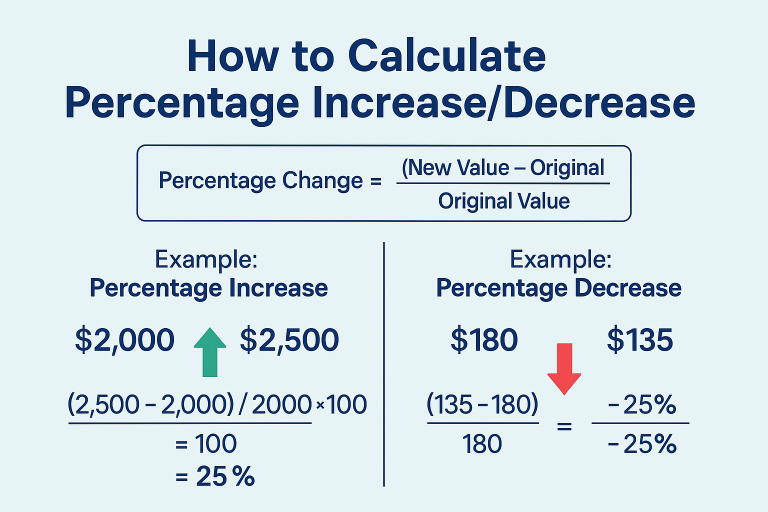
You’re tracking your savings. Last month: $1,200. This month: $1,400. You want to know the percentage increase.
You might try: 200 ÷ 1200 × 100 =
But halfway through, you forget which number goes where, or you lose track because your calculator doesn’t show your work.
The real issue: Percentage change calculations require you to remember a formula AND translate it perfectly into calculator syntax. One wrong tap and your growth rate is completely off.
5. The Multiple Discount Nightmare
“Take an additional 20% off already reduced items!”
Original price: $200, marked down 30%, then another 20% off.
Your brain: “So that’s 50% off total, right?”
Reality: “Actually, no.”
The math: $200 minus 30% = $140. Then $140 minus 20% = $112. That’s a total discount of 44%, not 50%. Stacking percentages is one of the most counterintuitive calculations out there, and basic calculators offer zero help.
Why This Happens: The Calculator Wasn’t Built for Your Brain
Here’s the uncomfortable truth: traditional calculator apps are digital versions of physical calculators from the 1970s. They’re built for people who already know exactly what mathematical operations they need to perform.
But when you’re in the real world—shopping, splitting bills, calculating tips, comparing deals—you’re not thinking in terms of mathematical operators. You’re thinking in questions:
- “What’s this going to cost me?”
- “How much should I leave?”
- “Is this actually a good deal?”
Your calculator app can’t bridge that gap. It doesn’t understand context. It doesn’t know that when you type a percentage, you probably want to do something specific with it. It just… sits there, waiting for precise instructions.
The Solution: Know Your Calculator’s Language (Or Find a Better One)
If you’re stuck with a basic calculator app, here are the formulas that actually work:
For discounts:
- Original price × (1 – discount as decimal) = Final price
- Example: $150 × 0.80 = $120 (for 20% off)
For tips and increases:
- Original amount × (1 + percentage as decimal) = Total
- Example: $67.50 × 1.18 = $79.65 (bill + 18% tip)
For finding what percentage one number is of another:
- (Part ÷ Whole) × 100 = Percentage
- Example: (15 ÷ 75) × 100 = 20%
For percentage increase/decrease:
- ((New – Old) ÷ Old) × 100 = Percentage change
- Example: ((1400 – 1200) ÷ 1200) × 100 = 16.67% increase
But Here’s a Better Idea
Instead of memorizing formulas and doing mental gymnastics every time you need a quick calculation, use tools designed for real-world scenarios. Dedicated percentage calculators, discount calculators, and tip calculators are built to understand what you’re actually trying to figure out.
They don’t make you translate your question into mathematical syntax. You just input the numbers that make sense—original price, discount rate, done. The calculator handles the formula in the background.
Think of it this way: you wouldn’t use a hammer to screw in a bolt just because it’s the only tool in your hand. Sometimes the right tool makes all the difference.
The Bottom Line
Your calculator app isn’t giving you wrong results because it’s broken. It’s giving you confusing results because it’s a general-purpose tool trying to solve specific-purpose problems. The percentage button exists, sure, but most calculators implement it in ways that don’t match how normal people think about percentages.
So the next time you’re standing in a store, staring at your phone, wondering if you’ve suddenly forgotten fourth-grade math—remember: it’s not you. It’s just a calculator that doesn’t speak human.
And maybe it’s time to find one that does.
Need quick, accurate percentage calculations without the headache? Try our percentage calculator designed for real-world situations. No formulas to memorize, no confusing syntax—just the answers you need, instantly.